Funny Face Editor - Photo Warp

Funny Face Editor - Photo Warp

Publisher Voyager Vanguard
Release Date 2025-08-14
Update Time 2026-06-10
Tags Cool , Creative , Drawing , Coloring , Comedy
Rating 3.0
Platform html5
Advertisement

Reviews

The Funny Face Editor Online Game is a delightful way to spend time creating silly portraits. The grid-based system is easy to use, and the real-time preview makes every adjustment fun. It is perfect for all ages, encouraging creativity without any inappropriate content. I highly recommend it for family fun.

About This Game

Game Introduction

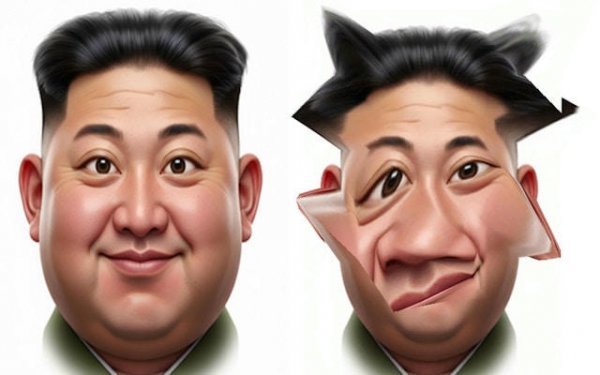
The Funny Face Editor Online Game is a creative playground where humor takes center stage. This tool is designed to generate laughter through absurd and funny photo transformations. Forget serious edits; here, the goal is to warp, stretch, and twist portraits into the most comical versions imaginable. With wacky distortion tools and an interactive photo grid, you can create uniquely funny faces that are safe and entertaining for all ages. It is a light-hearted, engaging experience focused solely on maximizing comedic effect.

How to Play

Getting started is incredibly easy. First, you can use a sample portrait or upload your own. The game presents you with a face overlaid with a flexible grid. Your mission is to manipulate this grid. Click and drag any point to stretch the underlying image. Want to create a long, silly smile? Just pull the corners of the mouth outward. Fancy giving someone a dramatically big head? Expand the grid points around the cranium. The real-time preview shows your hilarious masterpiece coming to life with every adjustment. The process is intuitive and engaging, focused on fun.

Game Features

Wacky distortion tools, interactive photo grid, endless creative possibilities, pure focus on fun, user-friendly interface.

Tips for Success

To get the most laughter from your creations, start with a clear, front-facing photo for best results. Experiment with different grid points to see how small changes can create big effects. Try combining multiple distortions, like a stretched nose with a squished eye, for extra silliness. Save your favorite creations to share with friends. Most importantly, don't be afraid to be bold—the wackier the edit, the bigger the laughs.

✅ Compatibility & Testing

• Desktop (Windows 11, macOS Ventura)
• Mobile (iPhone 14, Samsung Galaxy S23)
• Tablet (iPad Pro, Android tablet)
✅Supported browsers: Chrome, Safari, Edge, Firefox (latest versions)
❌ Not supported: Internet Explorer, older browser versions

System Requirements

OS Windows 7/8/10 64-bit
CPU Core i3 3.3 GHz
Memory 4GB RAM
GPU Intel HD 4000
CPU (Recommended) Core i5 3.5 GHz
Memory (Recommended) 8GB RAM
OS Mac OSX Mojave (10.14.6+)
CPU Core i3 3.3 GHz
Memory 4GB RAM
GPU Intel Iris Pro 5200
CPU (Recommended) Core i5 3.5 GHz
Memory (Recommended) 8GB RAM

Follow Us

Faq

Can I use my own photos in the Funny Face Editor?
Yes, the game allows you to upload your own portrait photos for editing. You can also choose from sample portraits provided in the game if you prefer not to use your own images.
Is the Funny Face Editor free to play?
The game is described as an online game, which typically means it is accessible for free through a web browser. However, specific pricing details are not provided, so it may be free or include optional features.
Do I need any special software to run the Funny Face Editor?
No special software is required. As an online game, it runs directly in your web browser. You just need an internet connection and a device with a browser, such as a computer, tablet, or smartphone.
Can I share my funny face creations with others?
While the game description does not specify sharing features, many online editing tools allow you to save or export your creations. You can likely share your images via social media or messaging apps after saving them.
Is the Funny Face Editor suitable for children?
Yes, the game is designed to be safe and entertaining for all ages. It focuses on light-hearted, non-offensive humor and wacky distortions, making it a family-friendly activity.
What types of distortions can I create?
You can stretch, warp, and twist various parts of a face using the interactive grid. For example, you can create a long smile, a big head, or squished eyes. The possibilities are limited only by your imagination.

Relevant Games