Advertisement
Color Spin Art Studio

Color Spin Art Studio

Publisher
Release Date
Update Time 2026-07-17
Tags Creative , Relaxation , Art , Casual , Family
Rating 3.0
Platform Html5

Reviews

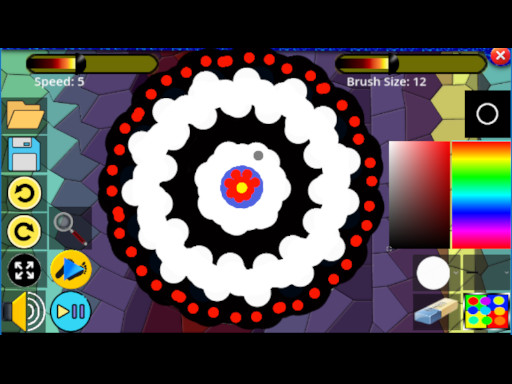
Color Spin Art Studio is a delightful tool for anyone seeking a peaceful creative break. The interface is clean and intuitive, allowing you to start making beautiful patterns immediately. The adjustable spin speed adds a nice layer of control. I especially appreciate how each session produces a completely original design, which feels very rewarding. It is a perfect way to unwind after a busy day.

About This Game

Game Introduction

Color Spin Art Studio is a calming online activity where individuals generate vibrant designs by rotating a digital surface. The main purpose is to appreciate the act of making art, rather than competing or reaching a particular milestone. What sets this experience apart is its emphasis on reducing stress and fostering imagination, allowing users to try different hues and shapes in a setting without pressure. Each session results in a unique composition, promoting discovery and personal expression. It is appropriate for individuals of any age and ability level, from those new to art to seasoned creators, offering a quiet break from everyday routines.

How to Play

To begin, users pick colors and a design style from the provided choices. Then, they rotate the surface using a finger on a touch device or a mouse on a computer. As the surface turns, the pattern changes in real time, producing evolving and surprising artwork. Users can modify the rotation speed and direction to affect the final appearance. There are no fixed rules or targets, so individuals are free to try various mixes. When a satisfying design appears, it can be stored on the device. The controls are straightforward and responsive, making the activity accessible to everyone.

Game Features

Color Spin Art Studio includes a broad selection of color options and design styles that enable countless creative possibilities. The activity offers adjustable rotation speed and direction, giving users authority over the artistic process. It is built for calm and stress reduction, with a clean interface that does not require any artistic talent. The activity may include a storage option to keep preferred creations. It is appropriate for all ages and can be played for brief or extended periods. The experience is always different, as no two rotations produce the same outcome.

Tips for Success

Since the activity centers on creativity and relaxation, there is no standard measure of success. To gain the most from the experience, try different color mixes and design styles to find surprising results. Change the rotation speed and direction often to see how they influence the design. Take your time and enjoy the process without focusing on the result. If a pleasing design appears, store it to build a personal collection. Playing in a quiet setting can improve the calming effect. Most importantly, release expectations and have fun exploring.

Compatibility

This H5 game runs smoothly on:
• Desktop computers (Windows / Mac) • Mobile phones (iPhone / Android)
• Tablets (iPad / Android)
🌐 Best experienced with Chrome, Safari, or Edge

System Requirements

OS Windows 7/8/10 64-bit
CPU Core i3 3.3 GHz
Memory 4GB RAM
GPU Intel HD 4000
CPU (Recommended) Core i5 3.5 GHz
Memory (Recommended) 8GB RAM
OS Mac OSX Mojave (10.14.6+)
CPU Core i3 3.3 GHz
Memory 4GB RAM
GPU Intel Iris Pro 5200
CPU (Recommended) Core i5 3.5 GHz
Memory (Recommended) 8GB RAM

Follow Us

Faq

Can I share my creations from Color Spin Art Studio with friends?
Yes, you can typically share your saved designs through social media or messaging apps. The exact sharing options depend on the platform you are using, but many versions allow you to download the image and then share it like any other picture.
Is Color Spin Art Studio free to use?
Yes, the basic version of Color Spin Art Studio is free to play online. Some platforms may offer optional in-app purchases for additional color packs or pattern styles, but these are not required to enjoy the core spinning and creating experience.
What devices are compatible with Color Spin Art Studio?
Color Spin Art Studio works on most modern web browsers, including those on desktop computers, laptops, tablets, and smartphones. It is designed to be responsive, so it should function well on both touchscreens and mouse-controlled devices.
Do I need an internet connection to play Color Spin Art Studio?
An internet connection is required to load the game initially, as it is an online activity. Once loaded, some features may work offline, but for the best experience and to save your creations, a stable connection is recommended.
Are there any age restrictions for using Color Spin Art Studio?
No, there are no age restrictions. The activity is designed for all ages, from young children to older adults. The simple interface and non-competitive nature make it suitable for anyone looking for a relaxing creative outlet.
Can I use my own images or colors in Color Spin Art Studio?
The standard version provides a preset palette of colors and pattern styles. Some advanced versions may allow you to import custom colors or images, but this feature is not guaranteed. Check the specific platform for available options.

Comments
0 comments
U
User
Loading comments...

Relevant Games