Smile Creator - Funny Photo Editor

Smile Creator - Funny Photo Editor

Publisher Voyager Vanguard
Release Date 2025-08-14
Update Time 2026-07-03
Tags Cool , Creative , Drawing , Coloring , Comedy
Rating 3.0
Platform html5
Advertisement

Reviews

Smile Creator is a delightful tool for anyone who loves humor. The grid-based warping is intuitive, allowing users to create hilarious faces in seconds. It is safe for children and adults alike, with no inappropriate content. The ability to upload personal photos adds a personal touch. The only minor downside is that it requires a clear front-facing photo for best results, but sample portraits are available. Overall, it is a fantastic way to spend creative time with family.

About This Game

Game Introduction

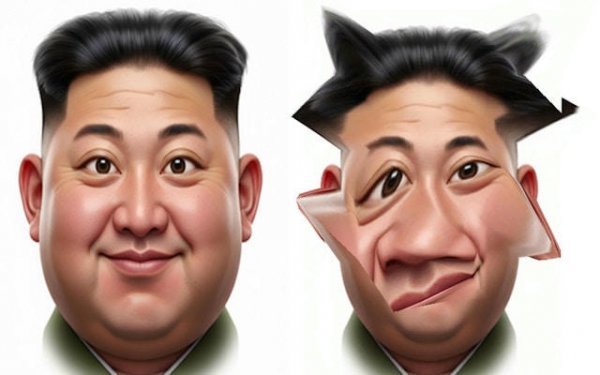
Smile Creator is a light-hearted online tool designed for making funny photo edits. The main goal is to take a portrait and transform it into something comical by stretching, twisting, and warping different parts of the face. Unlike serious photo editing software, this game focuses entirely on humor and creativity. It provides a safe, family-friendly environment where users of all ages can experiment with silly distortions. The core idea is simple: use a flexible grid overlaid on a face to pull, push, and reshape features like the nose, mouth, or eyes. Every adjustment creates a new funny expression, encouraging users to be bold and playful. The experience is intuitive and engaging, making it easy for anyone to start creating laughs right away.

How to Play

Getting started is straightforward. Players can choose a sample portrait or upload their own photo. The face is then covered with a grid of points that can be clicked and dragged. By moving these points, the underlying image stretches in real time. For example, pulling the corners of the mouth outward creates a wide, silly smile. Expanding points around the top of the head makes the forehead look larger. The process is entirely visual and responsive, so users see their funny creation take shape instantly. There are no complex rules or scoring systems—just pure creative fun. The game encourages experimentation, and users can undo or reset their edits at any time to try something new.

Game Features

Smile Creator includes a set of wacky distortion tools that allow for a wide range of funny effects. The interactive photo grid makes it easy to control exactly how the face is warped. The game offers endless creative possibilities because each photo and each adjustment is unique. The interface is user-friendly, designed for both children and adults to navigate without difficulty. The focus is purely on fun and laughter, with no ads or distractions that interrupt the creative process. Users can save their favorite creations to share with friends and family.

Tips for Success

For the best results, start with a clear, front-facing photo. Experiment with different grid points to see how small movements can create big changes. Try combining multiple distortions, like stretching the nose while squishing one eye, for extra silliness. Save your favorite edits to share with others. Most importantly, do not be afraid to be bold—the wackier the edit, the bigger the laughs.

✅ Compatibility & Testing

• Desktop (Windows 11, macOS Ventura)
• Mobile (iPhone 14, Samsung Galaxy S23)
• Tablet (iPad Pro, Android tablet)
✅Supported browsers: Chrome, Safari, Edge, Firefox (latest versions)
❌ Not supported: Internet Explorer, older browser versions

System Requirements

OS Windows 7/8/10 64-bit
CPU Core i3 3.3 GHz
Memory 4GB RAM
GPU Intel HD 4000
CPU (Recommended) Core i5 3.5 GHz
Memory (Recommended) 8GB RAM
OS Mac OSX Mojave (10.14.6+)
CPU Core i3 3.3 GHz
Memory 4GB RAM
GPU Intel Iris Pro 5200
CPU (Recommended) Core i5 3.5 GHz
Memory (Recommended) 8GB RAM

Follow Us

Faq

Can I use my own photos in Smile Creator?
Yes, Smile Creator allows you to upload your own photos. You can also use sample portraits provided by the game. This flexibility lets you create funny edits of friends, family, or even yourself.

Is Smile Creator free to use?
Yes, Smile Creator is a free online tool. There are no hidden fees or subscriptions required. You can enjoy all the distortion features and save your creations without any cost.
Do I need to download any software to play?
No download is necessary. Smile Creator runs entirely in your web browser. You just need an internet connection and a device with a screen to start making funny face edits instantly.
Can I share my funny face creations on social media?
Absolutely. Smile Creator lets you save your edited photos. You can then share them on social media platforms like Facebook, Instagram, or Twitter to spread the laughter with friends.
Is Smile Creator safe for children?
Yes, the game is designed for all ages. It contains no violent, adult, or inappropriate content. The only goal is to create funny, harmless edits that are suitable for family fun.
What types of distortions can I make?
You can stretch, twist, squish, or expand any part of the face. Common edits include making a big nose, a wide smile, or a tiny chin. The grid allows for precise control over each feature.

Relevant Games